Generate, attach, and email a Palestinian tax invoice from any Odoo customer invoice. Two new entries live under Action: Generate OTI queues a render request that the Hostinger VPS poller drains in ~5 s and attaches to the invoice; Send Tax Invoice opens a bilingual EN/AR mail composer with the OTI pre-attached. End-to-end: ~12 seconds.
إنشاء فاتورة ضريبية فلسطينية وإرفاقها وإرسالها بالبريد لأي فاتورة عميل في أودو. أضيف أمران تحت قائمة الإجراءات: Generate OTI يضيف طلباً إلى الطابور يستلمه خادم الـ VPS خلال 5 ثوانٍ ويرفق الـ PDF بالفاتورة؛ Send Tax Invoice يفتح محرر بريد ثنائي اللغة مع مرفق OTI جاهز. الزمن الكلي ≈ 12 ثانية.
1
START AT A POSTED CUSTOMER INVOICE
·ابدأ من فاتورة عميل معتمدة
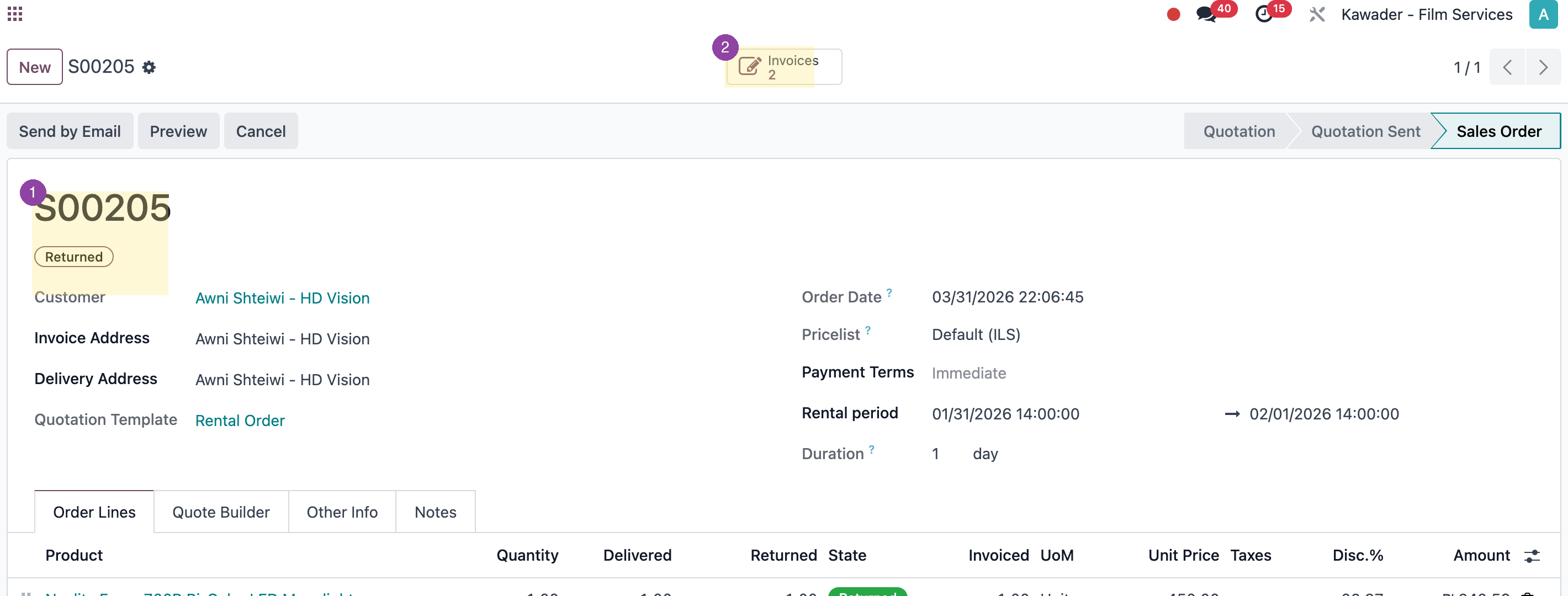
Open a posted sales order (here S00205). OTIs apply to any posted customer invoice; this is just the typical starting point. Click Invoices to reach the customer invoice page where the OTI is issued.
افتح أمر بيع معتمداً (هنا S00205). تُصدر فاتورة OTI من أي فاتورة عميل في وضع "معتمدة"؛ هذه نقطة الانطلاق المعتادة. اضغط على فواتير للانتقال إلى صفحة فاتورة العميل التي تُصدر منها فاتورة OTI.
1 Sales order S00205 (the typical starting point) · 2 Invoices (2) opens the related customer invoices.
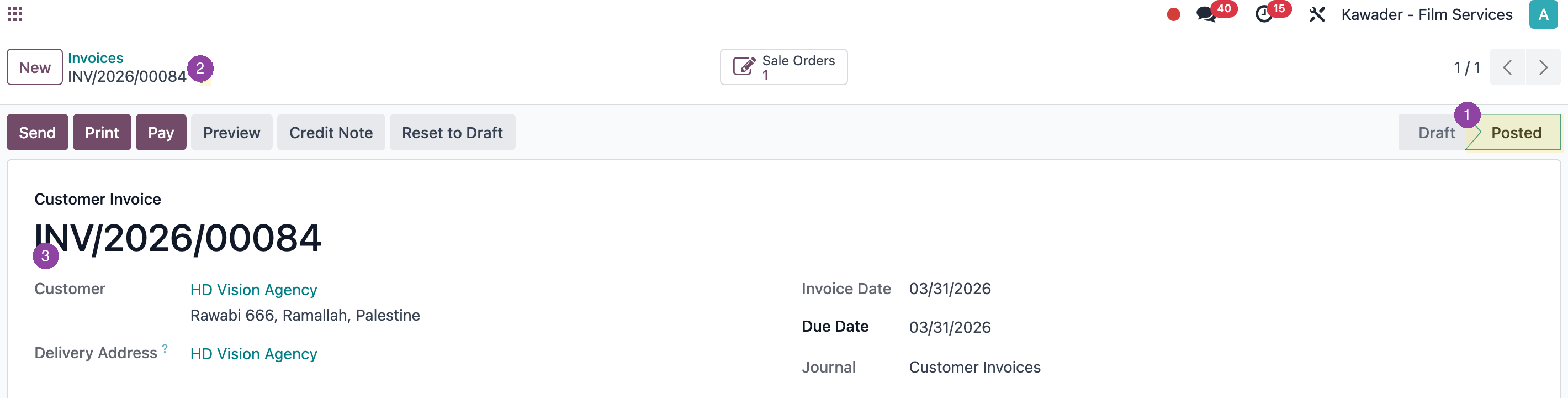
On the customer invoice (here INV/2026/00084), confirm the Posted state — drafts cannot be issued. The OTI commands live in the Action ⚙️ menu next to the breadcrumb. The customer block (name, address, email, phone, VAT) is mirrored into the OTI from the partner record.
على فاتورة العميل (هنا INV/2026/00084)، تأكد أن حالتها معتمدة — لا يمكن إصدار OTI من المسودات. أوامر OTI موجودة في قائمة الإجراءات ⚙️ بجوار اسم الفاتورة. تُنقل بيانات العميل (الاسم، العنوان، البريد، الهاتف، الرقم الضريبي) إلى الـ OTI من سجل الشريك.
1 Posted state (required) · 2 Action ⚙️ menu · 3 Customer block — mirrored into the OTI header.
1 حالة "معتمدة" (شرط أساسي) · 2 قائمة الإجراءات ⚙️ · 3 بيانات العميل تُنقل إلى ترويسة الـ OTI.
3
TWO NEW COMMANDS IN THE ACTION MENU
·أمران جديدان في قائمة الإجراءات
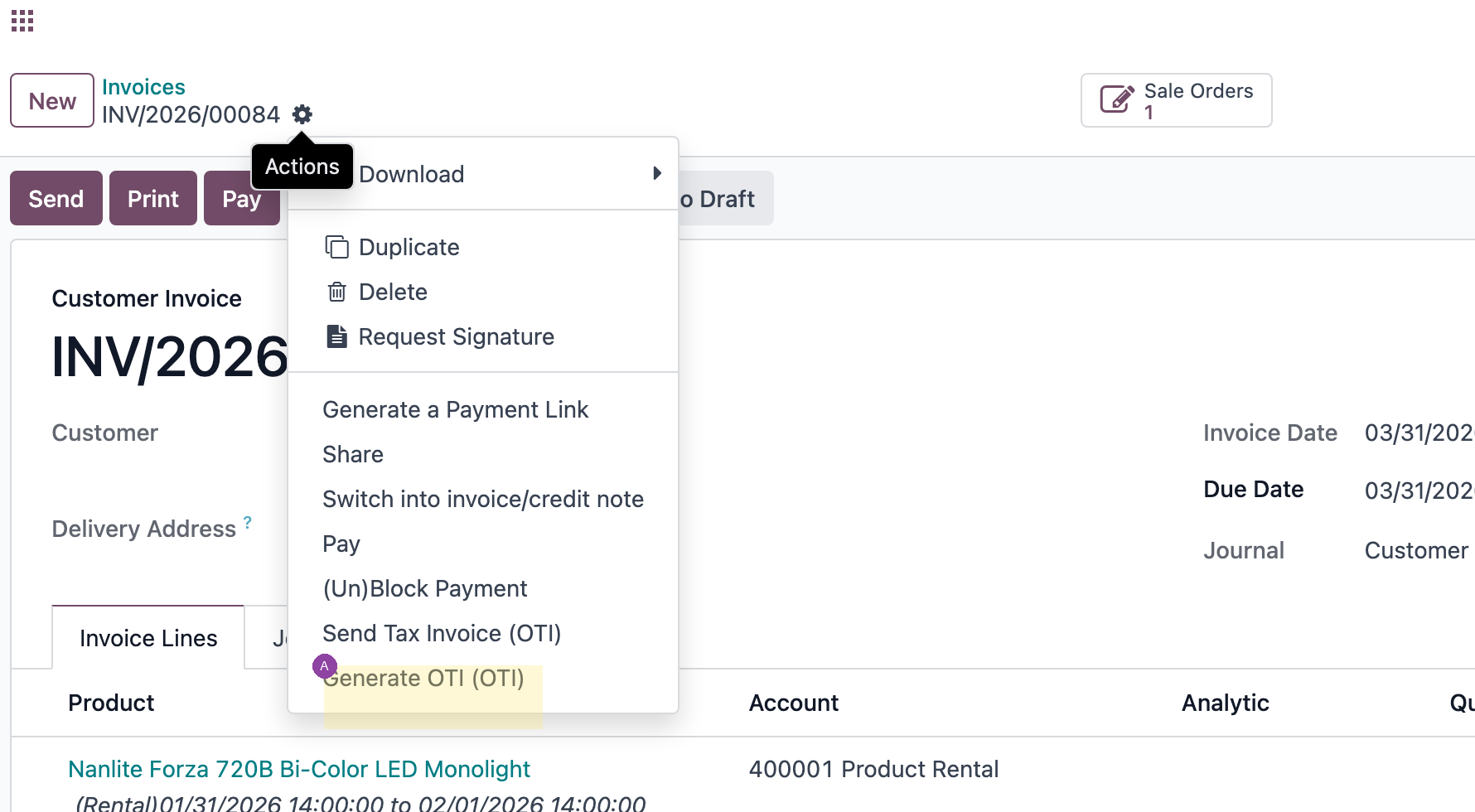
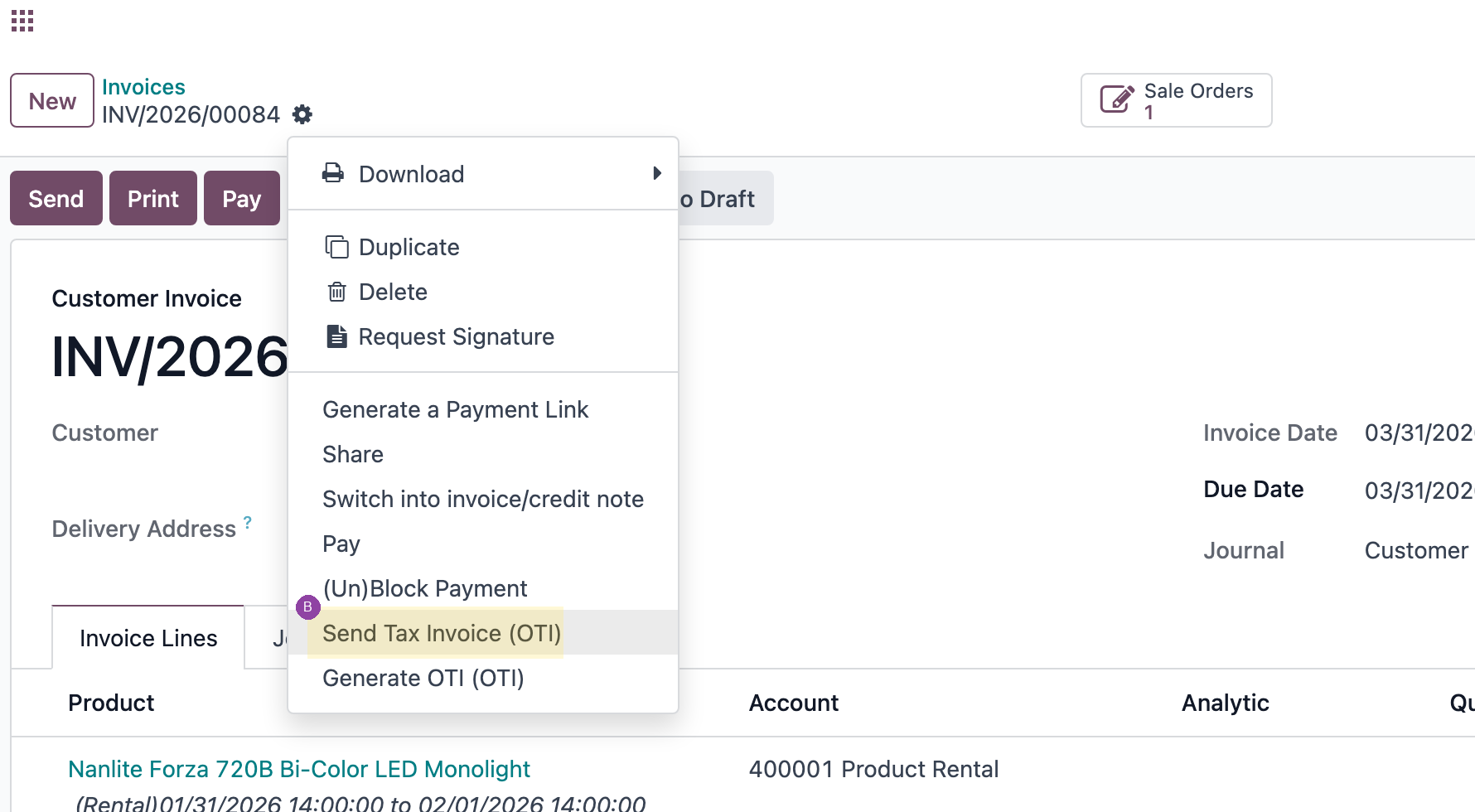
From the Action menu, (A) Generate OTI (OTI) queues a render request — the VPS poller picks it up in ~5 s and attaches the PDF + posts a chatter line. Then (B) Send Tax Invoice (OTI) opens the mail composer with the bilingual EN/AR template and the OTI PDF pre-attached.
من قائمة الإجراءات، (A) Generate OTI (OTI) يضيف طلب إنشاء OTI إلى الطابور — يلتقطه خادم الـ VPS خلال 5 ثوانٍ ويرفق الـ PDF ويسجّل سطر محادثة. ثم (B) Send Tax Invoice (OTI) يفتح محرر البريد بقالب ثنائي اللغة مع مرفق الـ OTI جاهز.
(A) Generate OTI — queues the render request.
Generate OTI — يضيف الطلب إلى الطابور.(B) Send Tax Invoice — opens the mail composer.
Send Tax Invoice — يفتح محرر البريد.
4
OTI PDF ATTACHED AUTOMATICALLY
·تم إرفاق ملف OTI تلقائيًا
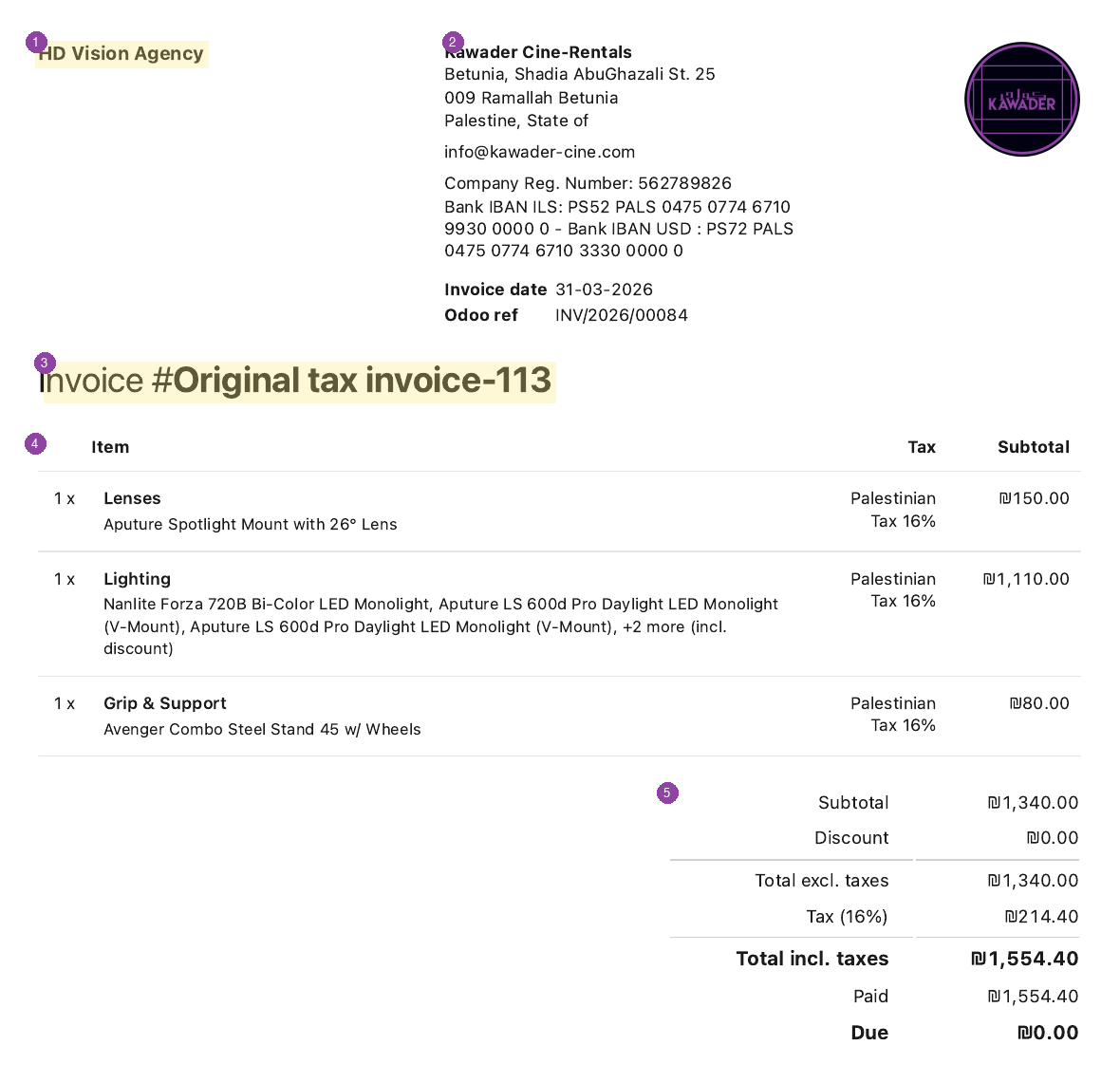
The attached OTI carries the gap-free Palestinian-tax sequence number (here #Original tax invoice-113). Invoice lines are auto-grouped into tax categories (Camera Body, Lenses, Lighting, Audio, Grip & Support, Storage & Power, Monitor, Cables). VAT is added on top of the Odoo subtotal — not split out: Subtotal ₪1,340 + Tax 16% ₪214.40 = Total ₪1,554.40.
1 Customer block · 2 Kawader header (fixed boilerplate) · 3 Gap-free OTI number · 4 Categorized lines · 5 VAT added on top of the Odoo subtotal.
1 بيانات العميل · 2 ترويسة كوادر (قالب ثابت) · 3 رقم OTI متتابع بلا فجوات · 4 بنود مصنّفة · 5 الضريبة تُضاف فوق المجموع الفرعي.
WHY THIS MATTERS/لماذا هذا مهم
Palestinian tax law requires gap-free sequential OTI numbers attached to every invoice. Before this work, OTIs were issued manually via a standalone Python script. This is the persistent, button-driven version any team member can fire from Odoo without writing code. Manual fallback (CLI): python tools/oti/build_oti.py --invoice INV/2026/NNNNN --env prod --attach.
يشترط القانون الضريبي الفلسطيني تسلسلاً متتابعاً بلا فجوات في أرقام الفواتير الضريبية الأصلية. قبل هذا العمل، كانت تُصدر يدوياً بسكربت بايثون منفصل. هذه نسخة دائمة بزرٍّ في أودو يستطيع أي عضو من الفريق إصدارها دون كتابة كود. البديل اليدوي (سطر الأوامر): python tools/oti/build_oti.py --invoice INV/2026/NNNNN --env prod --attach.